How to rip a DVD to the hard disk using DVDFab HD Decrypter Print E-mail
Most the DVD editing / converting tasks begin by ripping the DVD data in your hard disk, for various reasons. For example, DVDs are encrypted and by default most programs do not read these CSS encrypted files. Ripping the DVD files to the hard disk takes care of that and speeds up the process greatly as you only access the DVD once and then read all the data from the hard disk which is of course much faster and reduces the stress on your DVD drive that would have to keep working for many hours in case you were transcoding the DVD to another format.

The tool we are going to use the the free DVDFab HD Decrypter, probably the most common choice to rip a DVD since DVD Decrypter's development ceased. You can download it for free from here.

Step1
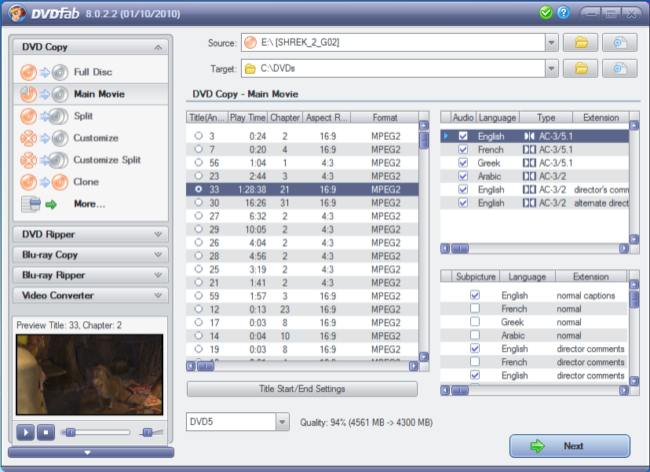
DVDFab01

This is the main DVDFab window. Please note that in the free version only the top two options are available, "Full Disc" and "Main Movie". As you suspect, the first one copies everything the DVD has (including menus, trailer, extras etc) while the second one only rips the movie itself. We will explain both modes. The screenshot above we have selected "Main Movie". Using DVDFab is pretty straightforward, first of all you have to select the DVD drive at the "Source" area and then the folder you want to save the files in at the "Target" field. Afterwards check the title that contains the main movie (the longest one) and remove any audio or subtitles streams you don't like. You are now ready to click on Start and begin ripping the DVD.


Step2
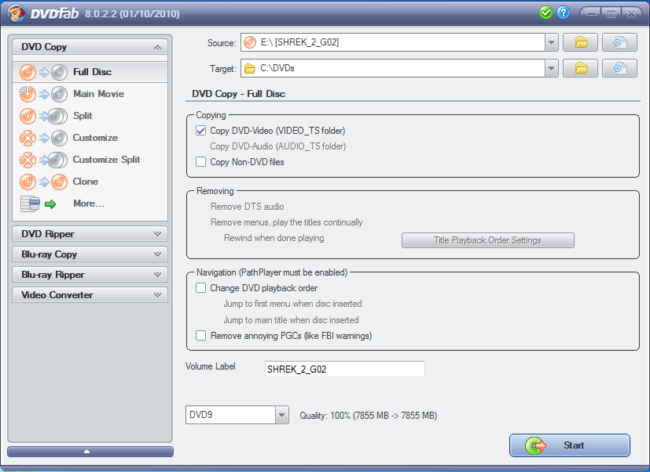
DVDFab2

The "Full Disc" function is every simpler. You don't have to change any setting at all, just as before select the DVD drive at the "Source" area and then the folder you want to save the files in at the "Target" field. Make sure "Copy DVD-Video" is selected and click Start!


Step3
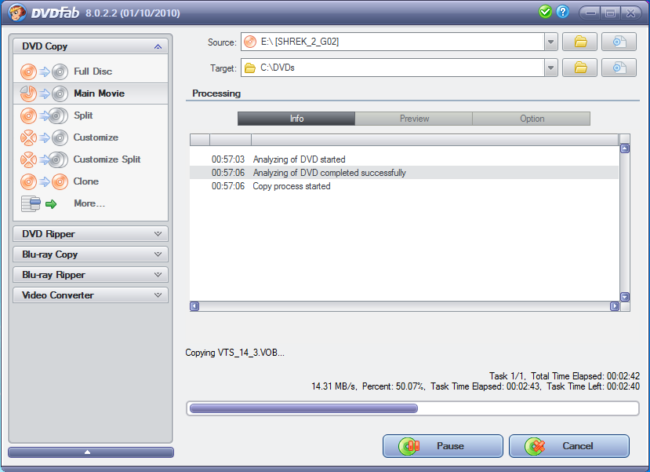
DVDFab3

The DVD ripping process that starts when you click the start button can take up to 30 minutes. You can cancel it or pause it at anytime. When it completes you have the DVD in your hard drive and ready to load it in any program you may want to process it with.

Tip There is a small number of DVDs that cannot be copied with DVDFab because they have some form of copy protection other than (or in addition of) CSS. In such cases your best bet is running AnyDVD in the background so that any additional protection gets removed as well.

Hits: 47544
Comments (6)Add Comment
...
written by theresa, February 03, 2008
thanks
report abuse
vote down
vote up
Votes: -2
...
written by 0,0, February 11, 2008
i'll try and i hope it works, because i tried several other progs to ripp FF-AC, but no Progr was able to (the most could even recognize it as video=) )
report abuse
vote down
vote up
Votes: +1
DVDfab Platinum
written by Dennis2, February 14, 2008
I have ripped and burned over 20 DVD's without a single problem. Be aware that if you are using the Main movie mode and you pick a Subtitle, you won't be able to turn the subtitle feature off, as you don't have a menu.
Great product.
report abuse
vote down
vote up
Votes: +3
DVD playback too fast and sound is out of sync
written by elhunko, February 21, 2008
I've tried this on a DVD but the ripped solution ends up being in a fast playback mode and the sound way out of sync. Are there certain settings that need to be adjusted?
report abuse
vote down
vote up
Votes: +0
DVDs taking 3 hours to copy!!
written by A, April 16, 2008
Why is it that DVD's are taking hours to copy for me? What am I doing that is making it take so long in either copying mode? I just bought a new Sony external DVD -R and that's what I'm using from my laptop. The movies are being sent to an external hard drive.
report abuse
vote down
vote up
Votes: +0
DVD taking 3 hours or more......reply............
written by D Buffoni, September 17, 2008
your CPU might be slow or you need more memory, faster CPUs and maximum memory will make burning a whole lot faster....
report abuse
vote down
vote up
Votes: +0

Write comment
smaller | bigger

security code
Write the displayed characters


busy