

Actually the full title of this article should be "how to put many movies or episodes in one DVD and when you shouldn't" ! I frequently receive emails from users that want to add many movies or a whole season of some series in one DVD. In this article I will try to explain what impact this would have to the quality (with video samples to see for yourself) of the DVD you will create and finally show you how you can create such a DVD using FAVC.
The DVD-Video Standard
The standard that all DVD-Video discs have to follow in order to be compatible with any player out there uses MPEG2 compression up to 9800kbps or in some rare cases MPEG1 up to 1856kbps. As you can understand, the mandatory use of the MPEG2 codec is our main limitation. The DVD format was finalized back in 1996, so they used what was then a cutting-edge compression technology. Unfortunately, as the years passed and new codecs like DivX/XviD or H.264 came out (MPEG4 if you want) with much greater picture quality in reduced sizes, for a DVD disc we still need to use the MPEG2 codec. The audio in the other hand, can be AC3, DTS or MP2 in multichannel setups, and we can have up to 32 subtitle tracks.
What retail DVDs use
Most DVDs in the market use a variable bitrate video of approximately 5000kbps video which is increased close to 8000kbps in high action scenes, which require more attention. Most of the times, the media used is DVD9 (7.95GB) in which they fit the movie, various audio tracks, menus and all extras. They rarely use DVD5 (4.38GB).
What happens in lower bitrate
As you understand, the lower the bitrate is, the most video a DVD can hold. However, since MPEG2 is an old codec, unlike H.264 which can achieve great results in low bitrate, anything under 3000kbps gives a very poor result which a significant amount of artifacts. Below I have created a small table which various bitrates, the approximate length of a video you could fit in a DVD (with a low quality AC3 audio in 128kbps in consideration) and an one minute sample from a movie using two free MPEG2 encoders to see for yourself the difference in quality. You can play the samples using the Open Folder option in VLC or with any other player of your choice.
| Bitrate | Aprox. Video Length in a DVD-5 disc | Aprox. Video Length in a DVD-9 disc | Sample videos |
|---|---|---|---|
| ~1000 kbps | 9 hours | 15 hours | HC Encoder | QuEnc |
| ~1500 kbps | 6 hours | 10 hours | HC Encoder | QuEnc |
| ~3200 kbps | 3 hours | 5 hours | HC Encoder |
What does this mean in practice
It depends on two things: the movie itself and the devices you will use for playback. Let me elaborate: if your movie contains many action scenes, explosions, fast chases etc or is shot mainly in dark (night) it will not look good if you lower the bitrate too much. In the other hand, a comedy or some sitcom will look better as the video is less demanding. If there is no need I wouldn't encode any DVD under 1500kbps. The action ones even higher.
Now the playback equipment is another parameter. For a handheld player (those with that small screens) or a SDTV (the old CRT ones) you will be fine. But if you are planning to use a HDTV (even in low resolution of an old DVD player) I suggest you don't squeeze too much video. For playback on a PC I don't even suggest a DVD-Video. Just convert to H.264 and burn a data DVD. Of course for a HDTV and an upscaling DVD player just encode one movie per DVD for maximum quality, you don't need me to tell you that.
Bottom line, I suggest putting up to two movies in one DVD9 and about half a season of any series. Of course, you know your needs better, that's why the table above explaining all options exists.
How to create a DVD that holds many movies or an entire season of a series using FAVC
At the guide below we will use the freeware tool FAVC to create a DVD that will hold five movies, which in this example means about 8 hours and 45 minutes of video and an approximate bitrate of 1100kbps (more on less like the first sample in the table above). I decided to use FAVC as it comes with both the encoders I mentioned above, lets you add subtitles per track and creates a menu. It is also pretty easy to use. Note that while other encoders like ConvertXToDVD are much faster and feature full, for such low bitrate the quality of the video is much worse than what we will create with this tool. Download it below.
Step 1
 |
|
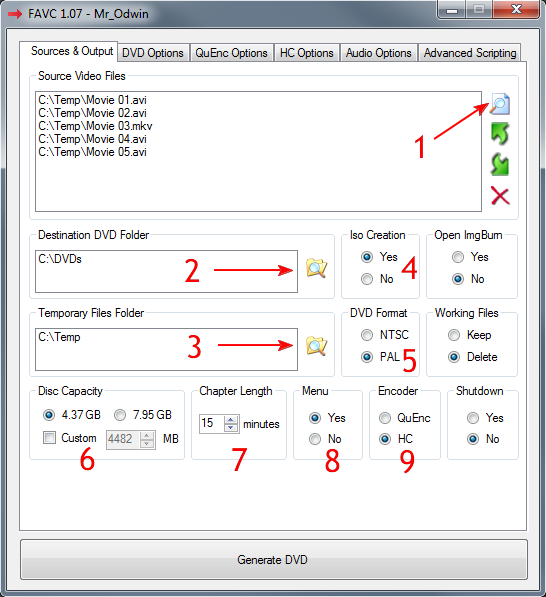
Select the DVD format (5) between NTSC and PAL, obviously depending on your equipment. Now set the target size (6) between a normal DVD and a dual layer one. Note that to burn a dual layer DVD you need a DVD9 disc and a burner capable of burning it, so make sure you can in fact burn such a disc. Chapter length (7) sets every how many minutes a chapter will be created (used to navigate though the movie with the remote). You would probably want to create a Menu (8) in order to easily select which movie you want to see. Note that you cannot have a menu if you add more than 10 videos (for example 20+ episodes of a TV show), for some reason FAVC limits the menu creation to up to 10 tracks. In that case this option will be disabled and you can select the episode to play with the Next Track button in your remote control. At the Encoder (9) option, my choice is HC. In my opinion, it creates better looking video than QuEnc, especially in lower bitrate. If you want to decide by yourself check the samples in the table above. To continue, click the DVD Options tab and move to the next step. |
Step 2
 |
|
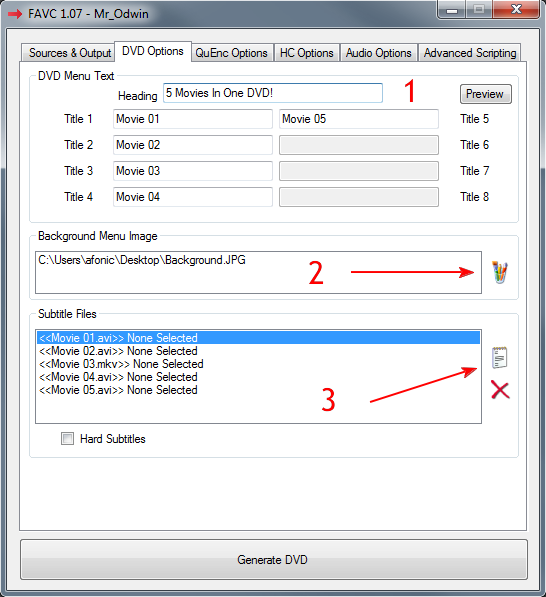
Click the HC Options tab to move on. |
Step 3
 |
|
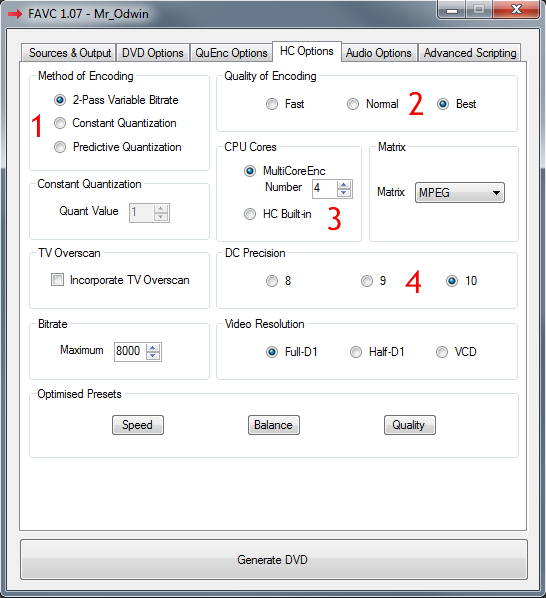
In Method of Encoding (1) select 2-Pass Variable Bitrate. In Quality (2) selecting Best will give the best possible quality but with great expense of time. In CPU Cores (3), if you have a multi core CPU (most new PCs do) choose MultiCoreEnc and set the number of the cores you want to use in order to speed the process significantly. Finally in DC Precision (4) set the value to 10 and click the Audio Options tab. |
Step 4
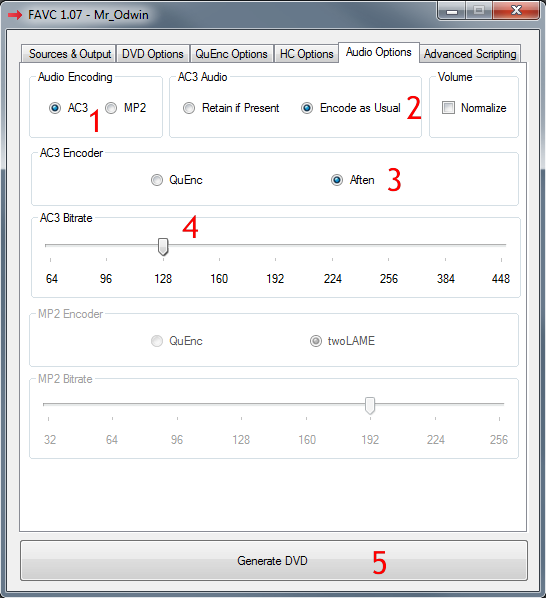 |
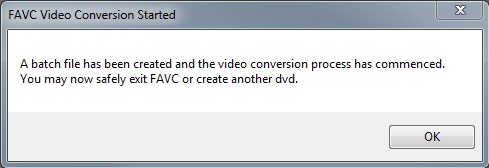
We will use AC3 as the audio encoding (1) codec. We will also select Encode as usual (2) as we cannot afford to possibly retain the present audio as it would be too big for such a small video bitrate: we need to use as less space as possible for audio. So, choose Aften (3) as the encoder and a bitrate of 128kbps (4). Finally click Generate DVD (5) to start the encoding. |
Step 5
 |
|
I hope you found this article helpful. If you need any more help or you have more questions, use the comments form below or the forum. |
Comments
Use ImgBurn and the DVD Video option. Details here:
http://www.dvd-guides.com/guides/dvd-burn/258-how-to-burn-dvd-video-using-imgburn
Just followed your instructions above,when the command sa finished do you just copy that file to a blank dvd and what software would be best to use,IMG-BURN, DVD Decrypter.
Thanks for the help.
http://www.videohelp.com/tools/MediaInfo
Also, have you tried using Quenc instead of Aften as the encoder?
For extra features and quality check out Mainconcept Reference and Cinemacraft.