

Making PS2 games work using a mod chip: A mod chip is a device used to circumvent the digital rights management and/or region coding for (in this case) your PS2. Modchips typically require some level of technical ability to install. Most commonly, modchips must be soldered on to a console's motherboard this is the main reason why people decide to skip this method and will use boot discs. But when the mod chip is installed properly it will be a much safer method to play your (copied) PS2 games.
Making PS2 games work using a boot disc: This method works just as well as the method above only when this method isn't performed properly it will greatly reduce the lifespan of your PS2. So we wont go into the trick of performing a disc swap with creditcards or other tools. If you really want to use the boot dics instead of a mod chip the best thing to do is buy a kit from Swap Magic and follow the instructions which will be provided along with the kit. Really the only plus to this method is that it wont void your warranty like the mod chip method.
Time to get started with copying your PS2 games. Copying a PS2 game is pretty easy because the old games dont have very good anti-piracy protection (or none at all) and the protection of the newer games isn't a problem for the new software on the market. Of course, even though backing up games you have already bought is allowed as "fair use" in most cases, before making backups of your games, make sure there is no law in your country that prohibits doing so.

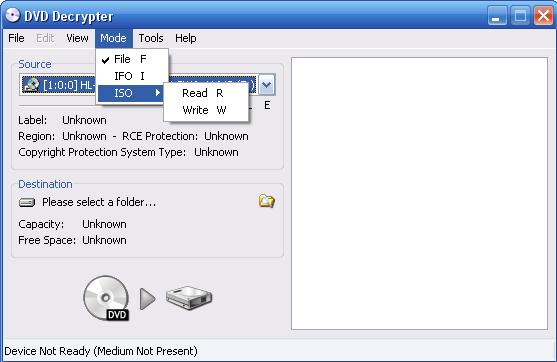
First of all you should get a good program to copy your PS2 games there are quite a few which will do the job these days, in this tutorial we will stick with DVD Decrypter . Many other programs will work aswell some of the best around are: CloneCD, Alcohol 120% and DVD Decrypter . When you chose the game you want to copy you can dowload DVD Decrypter here, when thats done its off to burning. DVD Decryptor is a very easy tool after you installed the program and started it you should see something like this:
(In this tutorial we will only dicuss how to make a copy of a game you already own)
When you get the same screen as the above image you should put the game you want to copy in your dvd burner and select in the programs toolbar 'Mode' you will be given three options: File, Ifo and Iso. To make a copy of the PS2 game in your drive you should select the 'Iso' option and select 'Read' then you should see an image like below.
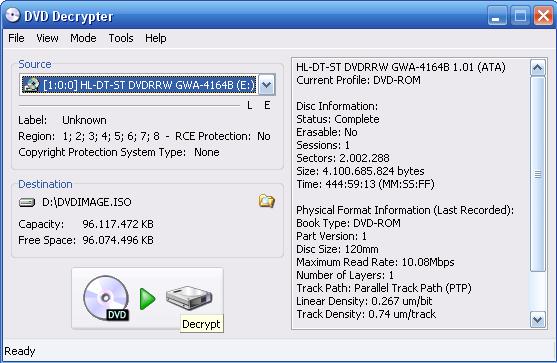
Now you should select the source in this case it will be the drive in which you got your playstation game, and off course the destination of the .ISO file (doesnt really matter as long as you can find it). When you done this should press the big 'Decrypt' button at the bottom, now the game will be decrypted this can take quite a while. When all has gone well you will see something like this:
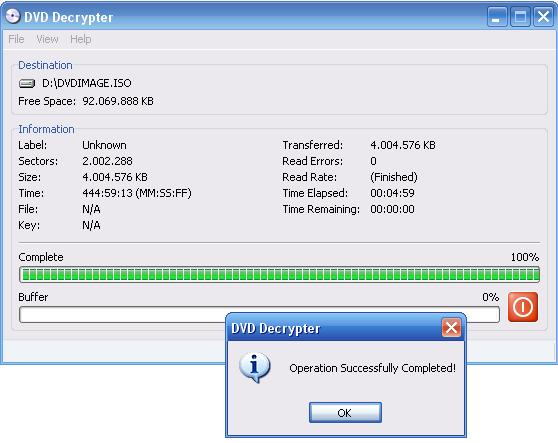
Now you got your .ISO file all you need to do is burn it to an empty DVD. To do this you should select 'Mode' >> 'ISO' >> 'Write' then you will see something like the image below. As source you select the .ISO file you just made and as destination your DVD burner in which an empty DVD is situated.
Important: put your writing speed at 1x.
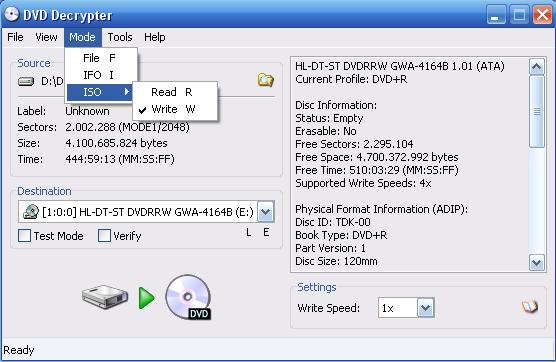
After all this is done all you need to do is click the big 'Write' button at the bottom and wait till the burning process is done. When everything has gone well you should see an image as below:
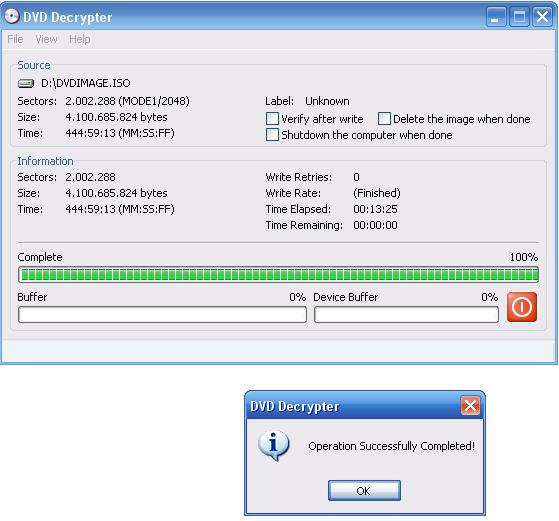
Congratulations you succesfully copied your PS2 game now its time to make it work on your PS2.

Now all you have to do is make the copied game play on your PS2, in the start of this tutorial the 2 different methods of doing this are explained all you have to do is make an choice between these 2 methods. When you made your choice either for a boot disc or a mod chip always try and get your parts from trustworthy shops like for example Swap Magic because quite some people get scammed on intenet with buying mod chips which dont work properly or dont work at all, good luck swapping/modding.

Now when your PS2 is ready to play copied games all you have to do is insert the game and have lots of fun.
Comments
1) u'll need dvd decrypter or imgburn(newer) software on ur pc.
2) [important] a good dvd of any kind. The best 1 is 16x and u have to write half of the disc speed. But there is a disc that pissed me off when i burn at write speed of 1x in a 8x disc, its isnt playable but if you want to burn a movie, it should be okay. 16x is Recomended.
Also i recomended using imgburn. Its free and it is an improved ver. of dvd decrypter.
can anyone tell me how to fix it????
Were to download it at :http://www2.ashampoo.com/webcache/html/1/product_2_1110__.htm
Tutorial on it :http://www.you tube.com/watch? v=HWfF8GqL6Ag&f eature=PlayList &p=46DF42294F20 A82E&index=1
Quickpost this image to Myspace, Digg, Facebook, and others!