Login
| How to rip a DVD to XviD/H264 using FairUse Wizard 2 |
|
|
|
|
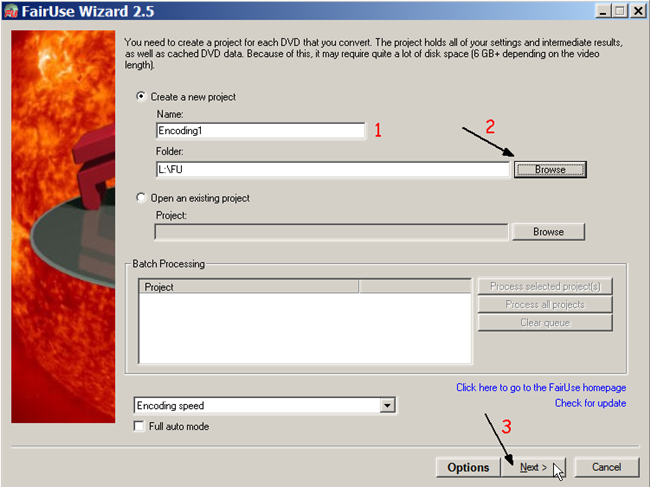
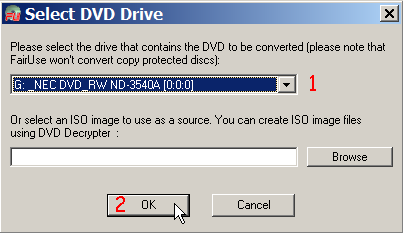
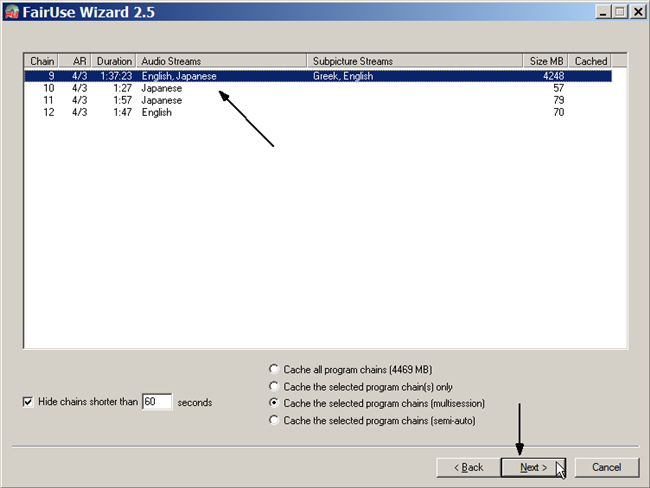
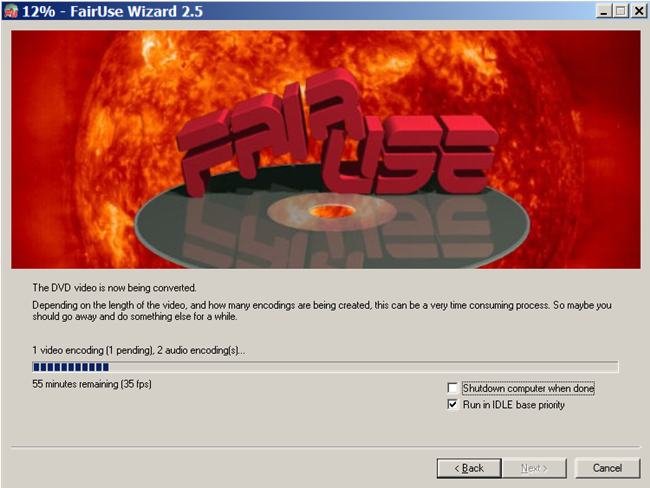
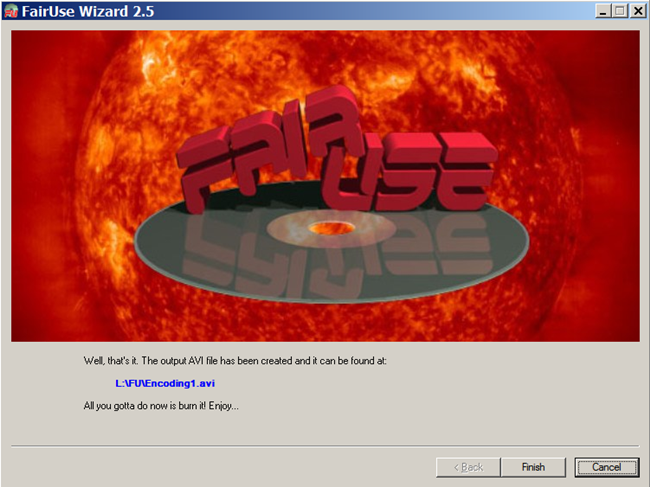
FairUse Wizard 2 is one of the most popular DVD rip programs because of its load of features and the simple wizard-like scheme it follows. However as most options are not really clear to the users we have been asked for a guides many times, so here it is! This guide will show you how to convert a DVD to XviD or the new H264 codec. Easily as you will see, one can add convert to any other codec as long as they are installed in his system. You can download the Limited Edition (has an 700MB output file limit, missing iPod support and some more features) here. You can buy the full version at the official site of the program which is located here.
Set as favorite
Bookmark
Email this
Hits: 132493 Comments (42)
![]()
Thank you
written by Reza, March 03, 2007
Thank you for a very clear and great guide and thanks to FairUse for an excellent software.
Great Guide
written by ForceRun, March 12, 2007
How do you use the Batch Processing Feature to do like a season worth of TV shows?
buy open source!
written by Shubbar, March 24, 2007
Thanks for this guide. But how can it be open source and they sell it? And when i tried to install it, no GPL license was mentioned. No licence was mentioned at all!
...
written by mel106, April 03, 2007
That is absolutely brilliant; FairUse is fairly straightforward and easy to use but if you have instructions like that it makes a whole lot more sense! I wouldn't have known what half of the options were for!
Thanks so much for your excellent guide. Mel
Sadly doesn't work under vista
written by vista_user, April 12, 2007
It stops and says that it can't create temp file.
Faster ripping
written by easytouse, April 22, 2007
This is a good guide. Thanks. However, i was wondering if there is a faster way (fewer clicks with lesser options) to rip DVDs straight to xVid/Divx with the best quality option preselected (even if the size of the output increases to 1.5-2gb)?
Excellent Tutorial!
written by Josue, May 18, 2007
I wanna thank whoever took the time to make this tutorial, it is very complete and you covered step by step everything needed to navigate through the program. For a newbie like me who experienced with a bunch of other useless programs and was just about to give up I would HIGHLY recomment this program to everyone and would say before trying ANY other program you gotta try this one and the most amazing thing is that it is FREE.
Good, but needs more details
written by Ivan the Terrible, May 22, 2007
It would be nice of you explained all the advanced options in detail. Like all those bitrate calculation button and such. That way those who want good stuff would be able to select for best video out put.
catfish31
written by stu, June 01, 2007
This is a great guide for a top notch piece of software (i use dvd shrink fisrt to create iso images of the dvds) then fair use to get them down to 700mb, put a few films in the queue then process all jobs at night fantastic !
Nothing working for me
written by BigZ, June 03, 2007
When I try to do step 3, windows pulls up an error saying "FU.exe has encountered a problem and needs to close. We are sorry for the inconvenience."
Don't know what to do
Thanks
written by Euro, July 11, 2007
Thank you for the tutorial. I'll try light version if it works for me, I will buy this tool. Thanks again. Regards.
video size help
written by zookeeper525, August 04, 2007
ok i have ripped about 20 movies now wit this and i have seen some movies screen sizes comes out very thin i like the wide screen but y on some its so thin if a setting i can use to zoom in or what ever i would love it thanks
nice and easy 9/10
written by www.phorum.ws dloadz, September 03, 2007
this is the first program I have had luck with right away, I use dvddecrypter and make an ISO file, then just load that! most other guides dont work or are too much hassle to do exactly what this does.... beautiful!
Tjohoo!
written by www.myfavorite.se, September 04, 2007
Heter det ett räddt marsvin, ett räddt rådjur? Neee..?! Bra program frstn, tycker om.
Problem with running the program
written by Kimms, September 12, 2007
I love the program....just wondering if anyone knows what does "muxing operation failed". I was able to use the program but now I get this error after going thru step 7? Is there a FAQ area? thanks
...
written by Kiddo, September 21, 2007
Too bad the program screws the sound by boosting the volume, making it all sound too load and distorted.
...
written by jinkoryu, October 28, 2007
can the output resolution be set to 720x480?
Even though my source video capture area I can set to 720x480, when the screen to set output resolution comes up I can only choose 720x385 or something like that...
...
written by ppfletch, November 04, 2007
What a relief!
Such a user friendly product for the novice - and free too! Thanks you very much.
http://www.dvd-creators.net/dv...r-mac.html
written by mathew, January 17, 2008
Goode guide, A similar guide for mac users to rip dvd.
Chuckie G - Your very wrong
written by Anon, February 10, 2008
its plainly obvious you have no knowledge of what your talking about. DVD Shrink reduces the size of a DVD encoding from DVD9 to DVD5 (so you can fit a dual layer DVD onto a single layer DVD). FairUse Wizard encodes from DVD to AVI.. which is a totally different format.
excellent program
written by techluvver, March 17, 2008
Great program and mostly easy to figure out by doing short 1 minute test iso for different quality settings. Although one thing I cannot figure out is - if I record a widescreen program from tv it seems to recognize it as a 4X3 and the aspect ratio is all out of whack.
Apart from that the de-interlacing feature is great for some older dvds. I found using a bitrate of 1100 produces great results and average movie is about 800-1000 megabytes.
Great program for quality encoding
written by Geek, July 12, 2008
I have used it to do mini comparison with AutoGK and TMPG 4 express although it may take a while to convert a dvd to divx (only compared divx) but the quality is great. Any one knows how can i use a Divx pro codec instead of the community codec thats included already in fairuse? I would like to see newer versions of fairuse utilising more of the quad cores.
Subtitle Help
written by adamneve, July 29, 2008
Excellent excellent program for the Novice like me. Thank you so much!!!
I'd like to convert some nice Asian DVDs and upload it with subtitles. Can anyone tell me if I can convert with 2 subtitles at once? Eg English and Chinese so I can upload both subtitles for others to choose. Great stuff!
Giving it a go
written by tronny, April 17, 2009
I did a search for encoding using x264 and im converting Ace Ventura pet detective atm. I set it to unrestricted slow. Going to take just shy of an hour (i do have a good pc).
I currently use DVD decryptor and AutoGK to rip my movies to xvid, if this works for x264 im now on that Oh, and i downloaded the full version via a torrent, so defiantly no 700mb limit. Lets face it, wouldn’t we all rather have good quality and less free space then shit quality with lots of free storage. 55x2 mins later : came out 1.36 gigs and looks the same as the dvd Fantastic. guide was good but the program wasn’t hard to follow either. Thanks for google linking me to this program
First-Time User
written by TikTikBoom, April 30, 2009 Worked great first time I tried it -- just the demo version. Nice, clear, bright yellow easy-to-read subtitles endorsed directly into the AVI file. Now I can watch my movies using my portable media player on the (LOUD) train commute to work, where I can't hear the dialog mostly because of the background train noise. I was worried I'd have to go back to reading or watching my skipping-and-freezing-up DVD player during my commute. This thing works great!
thanks a lot.....
written by psyrobbie, June 21, 2009
i was looking on the internet for easily ripping a dvd and i came across this tutorial....everything was so easy to understand......FairUse Wizard is such an amazing software......this was the first time i ever ripped a dvd......and just a few clicks away.....it came out almost the same as the original dvd quality......i ripped a two hour movie worth 6gb and converted to 800mb with retaining almost the same quality video......took me almost 5 hrs to complete......i dont need to look for anything anywhere now......thanks a lot....
crop error
written by Kitaro, January 28, 2010
I have a DVD with a wide animation. At crop settings i select 16:9 and i see a rectangle inside the movie frame cutting left and right bars from the main frame. This is ok. When i want to select the Output video size, resolutions from there don't match with my crop settings, and the final movie is too wide, and playing on my LCD it showed with black bars up and down so is not 16:9. Why the movie is not encoded at resolution from crop settings?
FairUse Wizard is Great Software for Everyone
written by Lifetime Upgrades, March 11, 2010
I have downloaded this software and after a couple of conversions, I had to purchase it. I didn't necessarily need the unlimited version but when someone has a great product I want to reward them and besides for lifetime upgrades after purchasing it was a bargain.
Thank you so much and continue the great work. Just wish there was an option to save as an ISO file.
...
written by dogman514, March 11, 2010
fairuse is alright if time is no object,i converted a dvd to avi with fairuse it took a little over 21 hours that a lot of time, the program is VERY SLOW,to compare i did the same conversion using AVS Video converter,AVS took only 4 hours and 17 minutes,big difference,i used two other converters one took 9hrs and 52 min.and the last one took 7 hrs 18 min.Fairuse has got to speed up the process otherwise this one is headed for the recycle bin.
Mr
written by johngou, March 17, 2010
it takes about 1 1/2 hours on a 1.8 system with codec specified settings to convert a 2 hours 16 min movie .. i say this is th efastes encoder out there. sweet
aaadddbbb
written by johngou44, March 17, 2010
to get the best quality u need to go into the detailed settings...
Excellent software
written by Intrepidone, March 19, 2010
Probably the best and fastest encoder I have used, and on my laptop. I have a Core 2 Duo T7800 2.6GHz and it takes approx 1 1/2 hrs for a 2 hr movie using 2 passes. I have tried Handbrake, MeGUI and AutoGK, they all take 4 to 6 hrs, I really don't understand why. If I use my Duo Core 3.6GHz computer with 4GHz RAM it takes about 4 hrs with FairUse. There must be some reason why my T7800 smokes using FiarUse
Re: 720x480 resolution
written by LifetimeUpgrades.com, May 15, 2010
Re: ...
written by jinkoryu, October 28, 2007 can the output resolution be set to 720x480? Even though my source video capture area I can set to 720x480, when the screen to set output resolution comes up I can only choose 720x385 or something like that... Has anyone came up with a solution to the above question. Sometimes the recommended settings squeeze the video vertically.
fast and furious written by luxo, June 19, 2010
dogman514 might have a sloooowwwww PC!
I do like many others here, and use DVD shrink to rip DVDs to ISOs or convert video_ts folders to ISOs (takes about 5 minutes on my Vostro 1500, Core 2 Duo T7250, 2Ghz) then use FairUse Wizard to convert those ISOs to .avi with subs, which generally takes about 30 minutes. If it's taking anyone longer than that, I'd recommend upgrading your shit :-) Write comment
|


Worked great first time I tried it -- just the demo version. Nice, clear, bright yellow easy-to-read subtitles endorsed directly into the AVI file. Now I can watch my movies using my portable media player on the (LOUD) train commute to work, where I can't hear the dialog mostly because of the background train noise. I was worried I'd have to go back to reading or watching my skipping-and-freezing-up DVD player during my commute. This thing works great!