How to convert DivX/XviD/WMV to DVD using Windows DVD Maker (Vista) PDF Print E-mail

The new Windows Vista are finally here and, like it or not, they will most possibly be the next OS the majority of PC users will use. In Windows Vista, and more particularly in Home Premium and Ultimate versions, Microsoft has included their new DVD creation program, simply called Windows DVD Maker.

Mini Review

Windows DVD Maker has a simple wizard-like user interface allowing you to easily create your DVDs. Even though the advanced user would like to have a few more options available, we can say for the purpose that this program was made, which is to easily convert your files to a DVD what is offered is enough.
In the other hand, we cannot say so for the media support. Windows DVD Maker was able to convert DivX, XviD, MPEG and of course, WMV files flawlessly, however it couldn't read AAC audio off AVI files, couldn't for some strange reason read all the DV camera files we threw at it and didn't recognize Matroska (MKV) and OGM media files at all. Also there is no option to add subtitles or more than one audio track. As a result, if you need to convert from these formats, add another language track or include subtitles you have to move to another solution that works under Windows Vista, like ConvertXToDVD. A big advantage Windows DVD Maker has, over similar simple solutions is that besides video conversion it can create slideshows DVDs from image files. Yes, other programs like PhotoDVD can do that, however Windows DVD Maker is able to merge both video and image files into one DVD! That way you can convert your vacation's video from your digital camcorder to DVD as well as include the images you took with your digital camera in a nice slideshow, both in the same disc and selecting what to see from the menu.
Leaving the lacking media support, we found that menu creation and the burning engine both worked very well. Windows DVD Maker will create very beautiful menus with nice effects and background video, making your home made DVDs look like professional authored discs, while the burning engine worked just fine and didn't produce a single coaster. Unfortunately we cannot say such positive words for the conversion speed, which was simply, horrible. It took it 7 hours to make a single DVD project that was converted in just 2 hours with ConvertXToDVD. Certainly not Windows DVD Maker's strong point.
As a bottom line, if you are just looking for a simple way to convert your files to DVDs, and you are only doing a limited number of conversions Windows DVD Maker should work fine for you. However, the serious problems it has, most importantly lacking media support and essential features for some users like subtitles or multiple audio files, including the awful conversion speed for those that use it often will lead most users using an alternative program instead of Microsoft's solution.


Guide

Step1

WindowsDVDMaker01

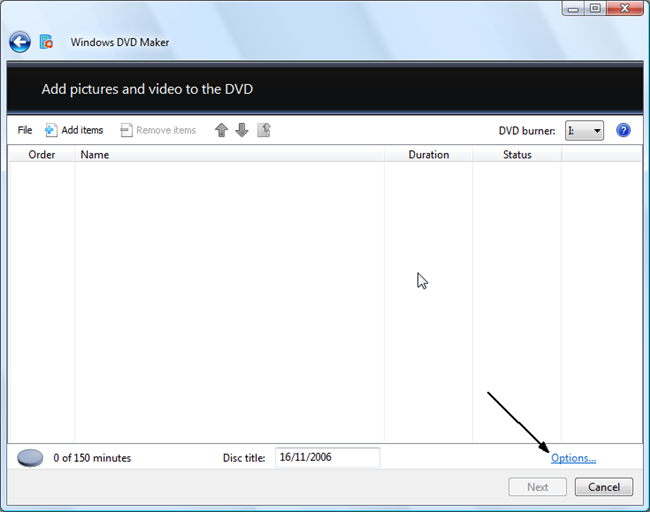
This is the main window of Windows DVD Maker. First of all we are going to explain the Options so click where the arrow shows.

Step2

WindowsDVDMaker02

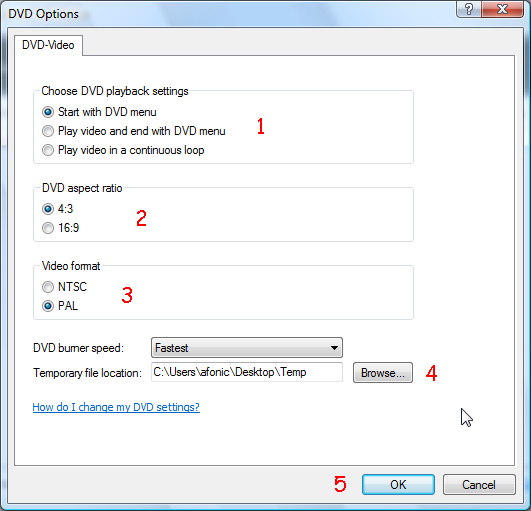
First of all you can select the playback settings (1), between starting the DVD playing with the menu (default action for most DVDs), play the video first and then display the menu or play the video over and over again in the loop and only show the menu if the viewer presses the "menu" button on its DVD player. DVD Aspect Ratio (2) should be set to the same like the source video files you have or resizing will occur and your movie will look funny. The video format (3) option should be set the the format you region uses. If you are not sure which system you use use this map to find out.
Finally you should a burning speed (if you face any compatibility problems try using a low value like 2x) and a temporary folder in a drive that has at least 5GB of data free. (4) When you are done, click OK (5) to move to the next step.

Step03


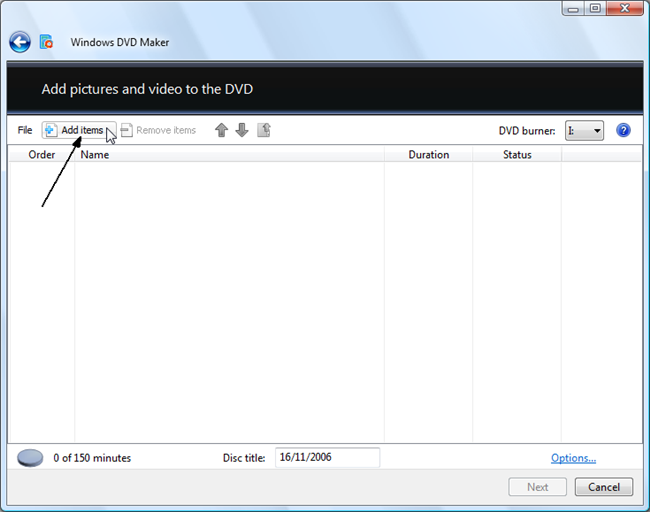
To get started you need to add the files you want to convert to the DVD format. Obviously, to do that select Add items on the top of the window and select all the files you are planning to put in your new project. You can add both video and image files, Windows DVD Maker will automatically put all image files in a "slideshow" category.

Step04

WindowsDVDMaker04

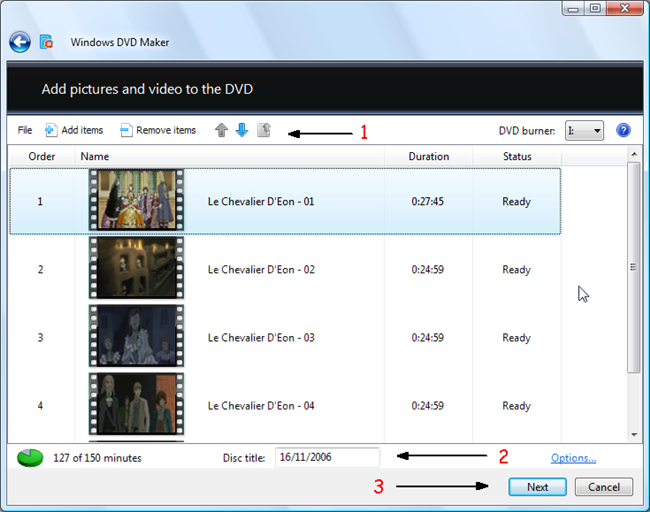
That's what Windows DVD Maker's main window will look like after you have added the videos you want to convert. In the top controls (1) you can add more items, remove some you already added and set the order you want to put them in the DVD. In the bottom controls (2) you can set the Disc title and see the space that is filled up (Windows DVD Maker uses a standard bitrate so you won't be able to add video than is longer than150 minutes nor adding less video will improve quality). When you have added the video files you want in the correct order click Next (3).

Step05

WindowsDVDMaker05

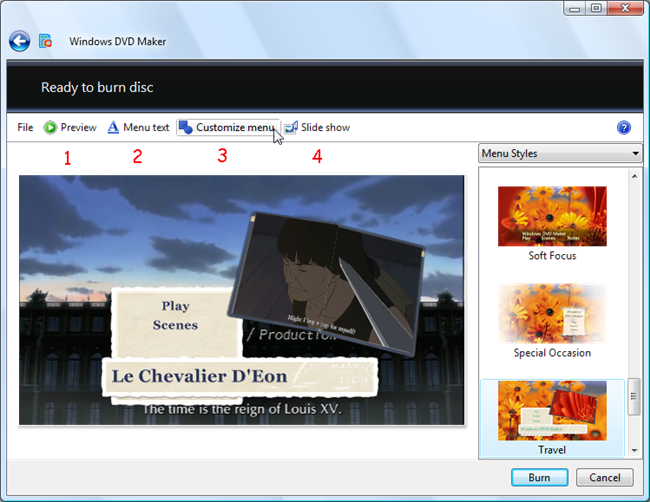
This is the menu editing screen. In the right side you can select the menu style you want to use. On the top you can use the Preview (1) button to check how your DVD will look like, the Menu Text (2) button to change the "Play", "Scenes" and title font face and size. We will explain the Customize menu (3) button in the next step, while Slide Show (4) is just a simple option screen that allows you to select the background music as well as the seconds each picture will appear for the slideshow.

Step06

WindowsDVDMaker06

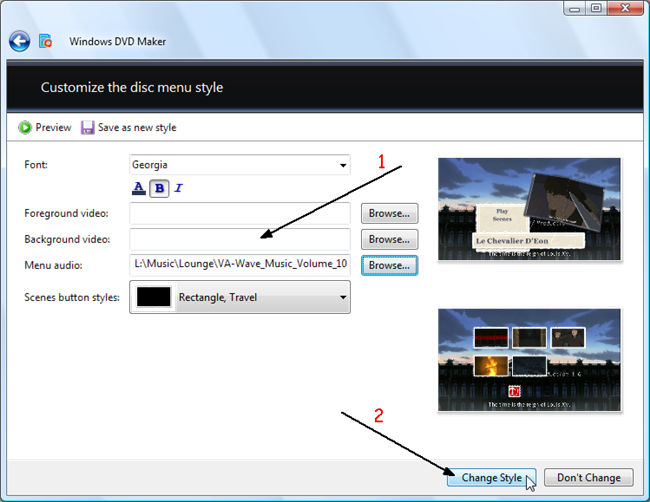
Lets explain the options (1) you can change in your menu one-by-one. Top of the list, the font options where you can set the font to use and basic options like underline, bold etc. Right next you can select the video that will play in the menu background and in the foreground (depending on the style you have selected the foreground position may differ). If you leave these blank Windows DVD Maker will automatically use one of the videos that you have added. In the menu audio screen you can select an audio file to use as background music in the menu, while in Scenes button styles you can select the shape and style of the scene select menu buttons as shown in the 2nd preview in this page. When you are done select Change Style (2).

Step07

WindowsDVDMaker07

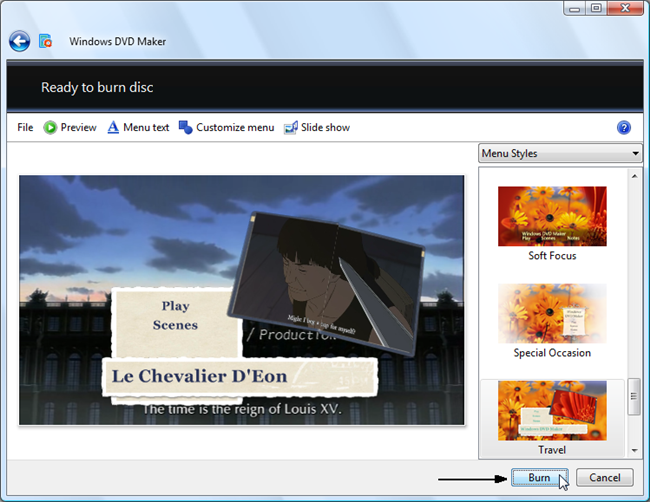
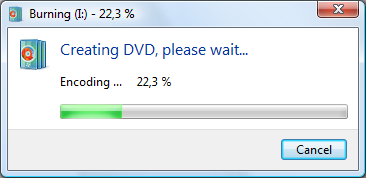
Everything should be set to get your DVD converted and burn right now! Just click Burn and you are good to go! Remember to put an empty DVD in the drive and do something else for the next few hours! Should you need any help, just use our forums (and not the comment form below!) and ask your question.

WindowsDVDMaker08

Comments (46)Add Comment
Windows Vista
written by vistauser, February 25, 2007
It looks like a decent program, if I just wanted to convert DV to DVD or I had a few files I wouldn't need to get another one. But right now I am just fine with ConvertXtoDVD and TMPEG, they work just fine smilies/smiley.gif
"Cannot create the DVD"
written by Michael J, March 03, 2007
I'm getting a message that says "cannot create the DVD". I can do small file size DVDs fine that are just a few minutes, but if I try to do one that's full or close to full, it runs for the duration until it's 99% done, then it fails and gives me the above message. I'm running Vista on a brand new Dell XPS-410 with 2 gigs of RAM. Any ideas??? Thanks! Mike
just can't figure it out...
written by nicolas b, March 04, 2007
I need some help...things are supposed to be made more user friendly and just keep getting harder and harder. So got a brand new camera that print mini DVD - Sony DCR DVD205. and got myself a new computer - HP - running with Vista. It seems that Vista can't read the .vob files created by the camera, when i convert them to Avi - using AVS converter - the avi files can't be read by DVD Maker...what am I missing - please help before I throw everything thru the window - won't be nice i live on te 32nd floor in NYC
Questions
written by afonic, March 06, 2007
Hi,

you would get better attention if you post questions in the forum than in the comments area.

@Nicolas: at my tests Windows DVD Maker failed to convert all any MPEG2 format, I believe you should use another program. (check ConvertXToDVD)
windows dvd maker is very poor
written by mickyarams, March 11, 2007
Hi,
The windows dvd maker crashes anytime I try to convert avi files to dvd,you don't get any sort of compression for your video which means you are only limited to 150mins of video and to sum it all the conversion speed is very slow.It took 5hours to convert a movie that took only 35mins on winavi.Although,the menu styles are cool,i don't know if there is any other dvd software out there that has got those type of menu styles.
can't custumised much
written by the man, March 20, 2007
i like the menu but it have too little customising...plus i get a lot of stupid message back...it doesn't convert the way i wanted too...ms need more codec installed with the program///
...
written by Jovers, March 22, 2007
Just tried DVD maker for the first time - then stumbled onto this guide.... Quite impressed saves me having to hunt for things on the net (as it came with vista) it took me 3hrs to burn a dual layer disc that was full... think maybe my quad core might have its advantages....

Good program, but could do with better compression options - like if i only had a 20 min video that was HD then i'd want to keep the quality (best i could) and to hell with the disc space it would waste....

Hopefully there will be an update for it and it will cure some of the minor announces...
Windows Movie Maker..etc(Window Media 11) can't recognize my minidvd
written by maimai, March 23, 2007
I just bought a new Sony HandyCam DCR-DVD105. I also just bought a brand new, very expensive Gateway desktop with Window Vista Home Premium. I was very excited to create a movie out of my mini-dvd. However, when I came to create it in the Windows Movie Maker, it said it did not recognize my dvd. Something about a .gup file. How else can I do this?
it sucks....
written by eNaR, March 24, 2007
This is truly a POSP (piece of $hit program). After adding divx or xvid files clicking on next causes the program to crash !! Why doesn't Microsoft stay at doing what it does best - pumping out weekly patches for its "not ready for prime time" new operating system instead of offering up a dvd authoring program that doesn't work...
...
written by B Gates, May 05, 2007
Works Fine For me, Your all just Stupid.......
Cannot add xvid, divx files to Win DVD Maker
written by denbor6, May 18, 2007
I have Vista on an HP mediacentre PC. Why can I not add my Divx and Xvid files to Windows DVD Maker to create a DVD that I can play on the DVD machine of my home theatre?. Where can I get a manual or help to solve this matter? The microsoft site seems to gloss over this.
Thanks
Sound OK but no picture
written by Terry F, May 29, 2007
The menu looks GREAT! but when I play the film there is no picture; The sound is OK. Anyone any ideas?
POS score
written by mrbungle1872, May 31, 2007
truly another poor attempt by microsoft wtf where are my options? and the help you have got to be joking its not helpful full stop i give it a POS score of 5 out of 5
Digital Camcorder
written by IA-mai, May 31, 2007
Well, everything is great. However, the part does suck with the whole dvd program. I freaking bought a brand new (CC)camcorder to go with my brand new computer. The program that came with my CC can't even be read by the computer. on top of that, it doesn't read my mini dvds! Now how am i suppose to create a movie dvd!? Spent freaking $2,000 for all this. Now i have to go out and find a video-editing program that is compatible* with this program. Estimate-$60-$200! UGH!
Vista DVD Maker
written by Joe D, June 21, 2007
I just bought a new Dell E520 Vista Home preminum...The DVD maker works but the finished DVD will not play in a fairly new dvd player. Roxio says the disk is left open or not finalized...Dell tech support tells me that the disk is actually closed...Any suggestions?????
Way tooooo slooooooooowwwwwwww
written by Tracey, July 03, 2007
I am now in my 6th hour of using Windows DVD Maker to make a 130 minute DVD and the disc is only at 23.5% burned. Does anyone know of any way to speed this process? Thank you.
bizarre error message for me!
written by ebonyruffles, July 09, 2007
Vista DVD Maker let me put a video together with all the fancy trimmings & such, then told me I had no burner installed! Go Figure!
Crashes and don't know what to do
written by marines_hg, July 12, 2007
Its a cool program but I barely did two dvds and now it crashes all the time i get to the part where i pick my menu. Any help anyone.
Codecs
written by darkrom, July 18, 2007
Anyone who is having problems download and install the K-lite codec pack. This will fix more than 1/2 of the problems I took the time to read.
Mr
written by Silver Surfer, July 21, 2007
Windows movie maker in vista home write files to DVD in Jpeg and a lot of DVD players only play Mpeg How do we convert
Won't recognize my dvd ram
written by gpracer01, July 25, 2007
Windows DVD Maker won't recognize my Plextor PX-712A. It's an IDE dvd burner but Vista recognizes it, just Win DVD Maker doesn't. I'm also only running Vista Home Premium.
DVD MAKER
written by shepherd1989, August 05, 2007
This set up is very POOR !! I had Sony before had no choice to us this. This is very time consuming, crashes, audio very poor. Still trying to find out how to burn this to a DVD. I keep getting an error. NOT ABLE TO BURN TO DVD .. I checked everything possible NOTHING ..
This is a very poor program for doing DVD's .. Hurry up Sony with the New Vista program.
Extra Menu Styles
written by Go Yankees, August 20, 2007
Great guide! Effective..thats what I need.

Does anyone know if and where more Menu Styles are available for download? I like the simplicity of Windows DVD Maker and my wife can actually use is (compared to something like nero), but I am finding the prepackaged menu style templates limiting.

I hope there are add-on styles that we can download??
Aspect wrong
written by divxxxx, September 02, 2007
DIvx movie burned to DVD. Original is 16x9 and plays as such. But if burned to dvd becomes squeezed with black bars added to sides. This program needs to allow aspect ratio select because its automatic doesnt work right all the time.
was fast on mine
written by dvddddddll, September 04, 2007
i am only using p4 ht, it took only 45 min encoding on an almost 2 hour xvid avi, not including burning to disc, i use the slow burning.
i use klite codec, video and audio was good.
i wonder if how fast on quad core????
codec, codec, codec!!!
written by codec, codec, codec!!!, September 04, 2007
its all about the codec people!!!
download them and you'll see the diff
16:9 doesnt work right with this program...
written by nickafn18, September 10, 2007
I've tried burning several DVD's using this program. The 16:9 option does not work! The movie is 16:9, and i know this for a fact, but it does not convert properly when burned onto cd. I have to deal with the stupid black bars on each side of the screen. Good Job Bill Gates...you fucked shit up again.
...
written by Vtolds, September 16, 2007
It wont let me add Divx files, it says they are not supported. I have installed the Klite drivers, and Vista drivers and still nothing.
...
written by still Confused, October 20, 2007
ok! i need some help. I've been converting divx and xvid file to dvd, by using Windows DVD Maker, everything came out fine Accept the DVD aspect ratio. I clearly set it to 16:9 in the options tab. This have been going on since I began using the program, can someone plz help. thnx
...
written by Atik, October 27, 2007
Its not the problem of codec that the conversion time is so long, its just this shitty MS Windows DVD Maker. I use nero vision and I can convert one movie in one hour, Processor dual core 1.6ghz. Windows DVD Maker always comes up with an excuse to crash, like any other MS Products. I guess MS is only good in making Crashing Products and charging the people shit loads of money
...
written by Atik, October 27, 2007
To Mr too old,
I would suggest that you use go to the phazeddl.com or download a BITTORRENT CLIENT and go to MININOVA.ORG and download the NERO 8 torrent, open the file with BITTORRENT and finish the download of NERO. Install Patch AND ENJOY. DVD's created by NERO can be played in any DVD Player and you will have very few glitches.
...
written by Thundrwagn, November 17, 2007
This program works perfectly fine on my computer. I only wish that there were more menu and design styles to choose from.

What about clips over 150 mins
written by Vale, November 26, 2007
One flaw that ppl havent noticed is that it doesnt not burn a clip of over 150 mins even though it can fit the disc. I've burnt one movie using windows dvd maker and i can say quality is quite good even though it took over 5 hours.
maybe conflict with other prog
written by conflict programs, January 01, 2008
i had usb portable hdtv,nero and other soft prog installed my pc (p4 3.6 ht,dvd burner,and ave grap card,vista ultimate) the dvd came out bad pic and sound.
i reinstalled vista, used klite codec with no other programs just vista took about less than 2 hrs from about 2 hrs xvid/divx avi movie including burning to disc.
(other choice was to uninstall all not micrsoft prog, i just want clean)
more than 150 min?
written by conflict programs, January 01, 2008
i think i tried dvd shrink with more than 150 min but gave me the "red bar"

im not so sure but i think iwas trying to compress a 3 hr movie.
anybody using quad
written by conflict programs, January 01, 2008
how fast vista dvd maker on quad or core 2 with ave video card
It runs well
written by lowellriggsiam, February 11, 2008
The program runs well on my Gateway 9600, however it is not very customisaeable. If you have too many codecs installed on your computer it may cause problems with the auomated windows. Overall after you get your codecs in order and configured it's nice for making quick dvds.
It sucks
written by HateWindows, February 26, 2008
I tried to use it once to make a DVD from my captured video files.
It crashed a couple of times and I then gave up. Went back to my Studio 9 software and NO PROBLEMS!

Microsoft; why don't you stop trying to rule the world and make a descent OS for a reasonable price.
what's with all the whinning?
written by Jon1234, March 27, 2008
I don't want to go off on a rant here... lol
Why is everyone so mad at microsoft. They've offered a simple, easy to use software, free of charge I might add, to be able to make DVD's.
I don't use this software, other then for simple stuff. Half of you are trying to do stuff that shouldnt' be done in this software, and if you don't realize that then YOU'RE just as much part of the problem.
I'm not going to go into everyone's comments and addres them, but seriously... Most of you "seem" to have some type of grasp of conversion. This is not a conversion tool. It's the equivalent of Movie Maker but DVD. If you're lookin for more then, you're in the wrong place.
Side note. Although DivX is very common place now a days. It is still very much a web-based codec.....meaning those who are using it are using it for internet videos of some kind. So don't expect that Micrsoft is going to make it compatible to a VERY SIMPLE ADD-ON DVD software creator. Lets be real.
hg
written by maris, April 15, 2008
hbtfr
dvd maker
written by verna, May 09, 2008
there is a problem with my dvd the first one i already burn it but now i was not able to burn it..plsss can you give me the details? on how to fix it..i was trying but its no longer to burn..thanks

dvd maker
written by verna, May 09, 2008
my dvd maker has stopped working ..i dont know to fix it ..
dvd Maker
written by Villas, September 09, 2008
The comments forgot the very HQ of the results ... for now the results here is better then Premiere encore ... believe it or not !
quad core
written by just bought a q6600, October 04, 2008
i will try to make a dvd a xvid avi with about no less than 120 min movie and i will post a result
i overclocked it to 3.0 ghz
so well see.
Movie dvd maker alternative
written by TedG, November 12, 2009
Dvdflick ... it looks like microsoft is copying others ideas ... way too many similarities ... and this ones free
Windows 7 & Windows DVD maker
written by adan, January 23, 2010
to start off its really good im happy with the results only thins is takes way too long to encode it. well. overall i give a 10. i love the high quality video it gives out btw the DVD menus are awesome

Write comment
smaller | bigger

security code
Write the displayed characters


busy
 
DVD-Guides.com on Facebook

Who is online

We have 291 guests and 0 members online
No users online.